Make GitHub Actions Do More For You
Most people just use GitHub Actions to run their tests. It can do far more: deploy a PR to production before merge, make release processes more robust and automate the boring chores you keep forgetting to do.
Here are a few patterns I’ve used to make my life easier with GitHub Actions. I’ve done a bunch to evolve Homebrew’s CI over the years so hopefully I can teach you something.
🚀 Merge Queues with Deployments
GitHub’s Merge Queue was the last big project I led at GitHub so I’m biased towards it. It provides a queue of one or more pull requests which are stacked, tested and merged together.
At GitHub, we had a “deploy then merge” workflow where PRs would be tested and then deployed to production before being merged. Most of our customers had a “merge then deploy” workflow where merges to the default branch would then be deployed. I always liked the GitHub approach but doing it with non-GitHub tooling was a bit tricky.
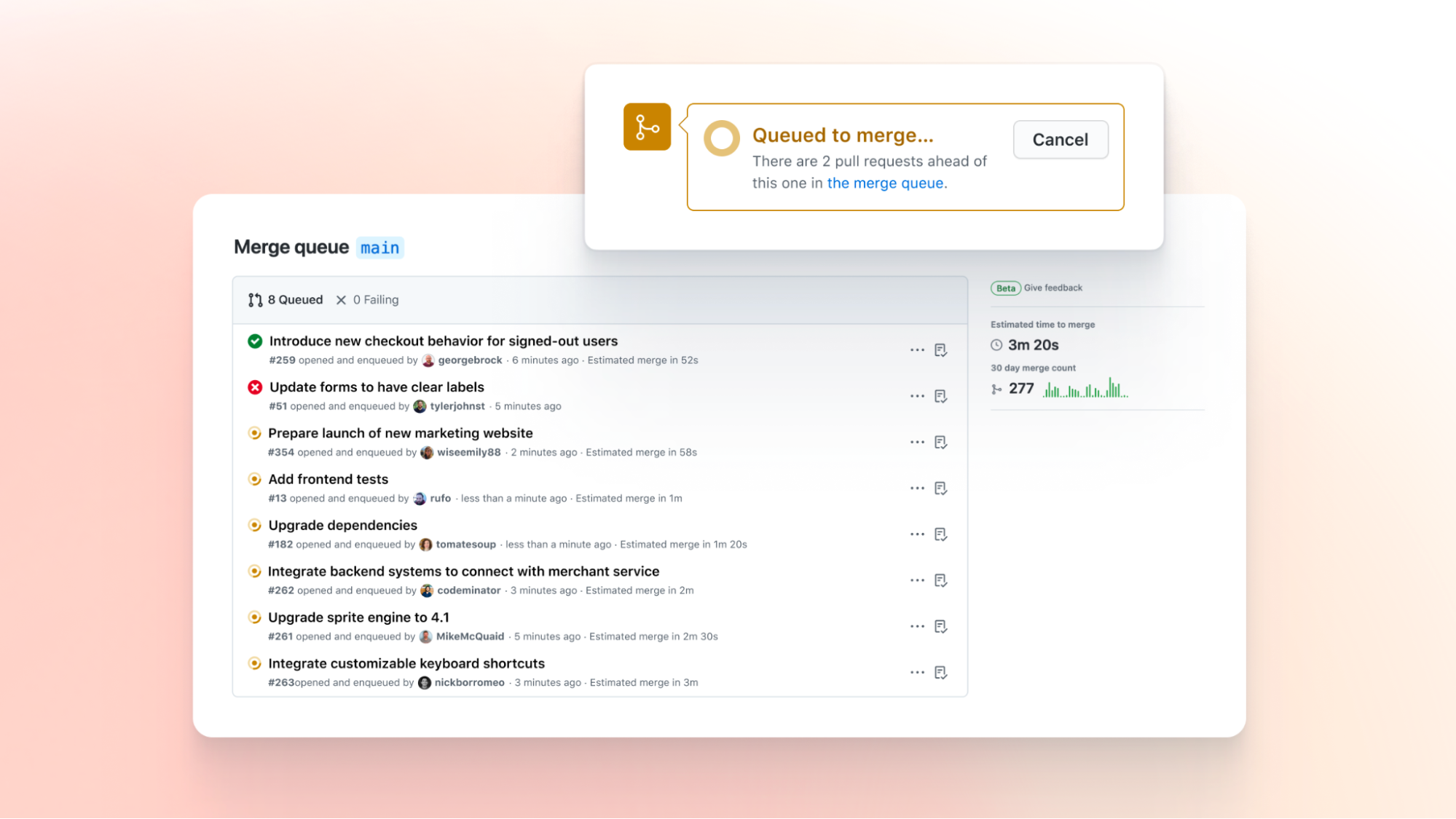
I found a nice way to do it with Merge Queues in Workbrew and Administrate.
The GitHub Actions trigger is the merge_group event: a job that only runs there can deploy the merge commit to production before it is pushed to main (or: the default branch).
This provides the nice benefit that anything that ends up on your default branch has already been successfully deployed to production.
on:
  # The merge queue trigger event
  merge_group:
  # The usual pull request jobs
  pull_request:
  # Duplicate push job to keep caches warm (see below)
  push:
    branches:
      - main

concurrency:
  group: ${{ github.workflow }}-${{ github.event_name }}${{ github.event.pull_request.number }}
  cancel-in-progress: true

permissions:
  contents: read

jobs:
  tests:
    runs-on: ubuntu-latest
    steps:
      - uses: actions/checkout@v7
        with:
          persist-credentials: false
      - run: script/test

  deploy:
    # Only deploy from the merge queue, before the merge lands on `main`.
    if: github.event_name == 'merge_group'
    needs: tests
    runs-on: ubuntu-latest
    environment: production
    concurrency:
      # Never let two production deploys race each other.
      group: deploy-production
      cancel-in-progress: false
    steps:
      - uses: actions/checkout@v7
        with:
          persist-credentials: false
      - run: script/deploy --production
environment: production gets you deployment history, environment protection rules and secrets.
The concurrency group makes sure two production deploys never occur at once.
Homebrew’s tests.yml is a real-world example of wiring up merge_group (without the deploy step).
Some gotchas here:
merge_groupruns readactions/cacheentries but can’t write them. Only apushto your default branch populates the cache, which is whymainis in the trigger list above. Skip any non-pushjobs or steps that aren’t needed to write cache entries so you’re not running steps unnecessarily.- the merge queue will only wait for
requiredjobs to besuccessfulorskippedbefore merging. This means you should think carefully about what jobs should run at PR time, merge group time or both. - merge queues unfortunately need a paid GitHub organisation plan (so don’t work on personal repositories).
🏷️ Releasing inside GitHub Actions
Another thing I’ve found myself wanting to do on a bunch of projects (e.g. Homebrew, Workbrew) is making a GitHub release with a binary built then uploaded by GitHub Actions. The typical way this is done is to create a release on GitHub, have a GitHub Action build the binary and then upload it to the release. This is nice when it works but periodically: whoops, something you did since the last release broke the release pipeline. At this point you have a broken release and tag and the only real way to fix it is to release again.
Some people will delete and recreate a tag when doing this. Please don’t! Git really dislikes changing tags and will not update them in local clones like you expect. Package managers like Homebrew also get confused as to whether this was on purpose or if you got hacked. Now that GitHub supports immutable tags: enable them to avoid even tempting yourself.
Instead, we can rely on the fact that you can create a tag locally in a Git repository and push it later.
A workflow_dispatch trigger is really handy here: it gives you a manual “Run workflow” button in the GitHub UI, complete with the inputs you define (like the tag name below) so you can make a release with a few clicks in GitHub and no development environment.
on:
  # Manual trigger used to create a new release.
  workflow_dispatch:
    inputs:
      tag:
        description: "Git tag for the release"
        required: true
        type: string
  # Run a dry run when pushing relevant files to avoid breakage.
  push:
    paths:
    - .github/workflows/release.yml

permissions:
  contents: write # to push the tag and create the release

jobs:
  release:
    runs-on: ubuntu-latest
    steps:
      - uses: actions/checkout@v7

      - name: Create the tag locally
        if: github.event_name == 'workflow_dispatch'
        env:
          TAG: ${{ inputs.tag }}
        run: git tag "${TAG}"

      - name: Build the binary
        run: script/build

      - name: Create release (dry-run on push)
        env:
          GH_TOKEN: ${{ github.token }}
          TAG: ${{ inputs.tag }}
        run: |
          if [ "${{ github.event_name }}" = "workflow_dispatch" ]; then
            git push origin "${TAG}"
            gh release create "${TAG}" --generate-notes
          else
            # check permissions without creating anything
            gh release list
          fi
This workflow is nice because it tags locally, only tagging on GitHub when the release is successful and everything was built.
This means you can use git describe to generate your version number and have it match the release tag, even before it was pushed to GitHub.
The dry run mode avoids things being broken accidentally.
It should do everything except for the actual release and upload of the binary.
Homebrew’s release.yml creates the tag locally this way and only uploads once the build and tests have passed.
👢 Local Development Bootstrap
If you have a local development setup using Homebrew on macOS or Linux it is rarely tested as carefully as production code. Instead have a job that runs your real bootstrap to avoid things being broken for the next person that onboards to your team.
on:
  push:
    branches:
      - main
  pull_request:
  schedule:
    - cron: "0 0 * * *"

permissions:
  contents: read
  issues: write

jobs:
  bootstrap:
    strategy:
      fail-fast: false
      matrix:
        os: [macos-latest, ubuntu-latest]
    runs-on: ${{ matrix.os }}
    steps:
      - uses: actions/checkout@v7
        with:
          persist-credentials: false

      - name: Run the developer onboarding bootstrap script
        id: bootstrap
        run: script/bootstrap

      # Open a tracking issue (one per OS) the first time bootstrap breaks.
      - name: Open an issue on failure
        if: failure() && steps.bootstrap.outcome == 'failure'
        env:
          GH_TOKEN: ${{ github.token }}
          TITLE: "Bootstrap is broken on ${{ matrix.os }}"
          URL: ${{ github.server_url }}/${{ github.repository }}/actions/runs/${{ github.run_id }}
        run: |
          gh issue list --state open --search "${TITLE} in:title" | grep -q . ||
            gh issue create --title "${TITLE}" --label bootstrap \
              --body "Bootstrap failed: ${URL}"

      # Close it again once bootstrap is green.
      - name: Close the issue on success
        if: success()
        env:
          GH_TOKEN: ${{ github.token }}
          TITLE: "Bootstrap is broken on ${{ matrix.os }}"
        run: |
          gh issue list --state open --search "${TITLE} in:title" --json number --jq '.[].number' |
            while read -r number; do
              gh issue close "${number}" --comment "Bootstrap is green again."
            done
🔄 Autocommits
When you’ve got manual jobs you run periodically that update or clean up files, get GitHub Actions to do this for you. It can regenerate files, check for differences, commit them to a branch and open a pull request. On reruns, force-push so the PR always reflects the newest version.
on:
  schedule:
    - cron: "0 0 * * *"
  workflow_dispatch:

permissions:
  contents: write
  pull-requests: write

jobs:
  update:
    runs-on: ubuntu-latest
    steps:
      - uses: actions/checkout@v7

      - name: Regenerate the files
        run: script/generate

      - name: Commit and open (or update) a PR
        env:
          GH_TOKEN: ${{ github.token }}
        run: |
          # Nothing changed: clean exit, no branch, no PR.
          git diff --quiet && exit 0

          git config user.name "github-actions[bot]"
          git config user.email "github-actions[bot]@users.noreply.github.com"

          BRANCH=autogenerated-files
          git switch -C "${BRANCH}"
          git commit -am "Update autogenerated files"
          # Force-push so the branch always matches the latest run.
          git push --force origin "${BRANCH}"

          # Open the PR only if one isn't already there.
          gh pr view "${BRANCH}" &>/dev/null ||
            gh pr create --head "${BRANCH}" \
              --title "Update autogenerated files" \
              --body "Automated update of autogenerated files."
This avoids having developers remember to run these and make a PR for them. It also helps catch drift between environments.
If your team is happy with it: you can also make these trigger on push events on PRs and auto-update files within a PR e.g. fixing lints.
⏰ Cron Jobs
I’ve very deliberately not had a personal server for many years. I really like avoiding the maintenance and security burden of running one. I prefer PaaS vendors (e.g. DigitalOcean) for hosting apps but often I just have some unrelated task I want to run on a schedule.
GitHub Actions works nicely for this use case.
You can have a cron line on schedule, a workflow_dispatch to trigger it on demand and have it automatically run on various other GitHub events or its own change.
on:
  schedule:
    # Every day at 07:00 UTC. Cron is always UTC, so mind your timezone.
    - cron: "0 7 * * *"
  # Re-run (as a dry-run) whenever the script or workflow itself changes.
  push:
    paths:
      - .github/scripts/sync.rb
      - .github/workflows/sync.yml
  workflow_dispatch:

permissions:
  contents: read

jobs:
  sync:
    runs-on: ubuntu-latest
    concurrency:
      group: sync-${{ github.ref_name }}
      cancel-in-progress: true
    steps:
      - uses: actions/checkout@v7
        with:
          persist-credentials: false
      - uses: ruby/setup-ruby@v1

      - name: Sync (dry-run on push)
        env:
          API_TOKEN: ${{ secrets.API_TOKEN }}
        run: |
          if [ "${{ github.event_name }}" = "push" ]; then
            .github/scripts/sync.rb --dry-run
          else
            .github/scripts/sync.rb
          fi
This lets you run this script regularly without the overhead of maintaining a server. GitHub Actions’ secrets handling means it’s also fairly easy to do sensitive operations without needing to do so manually or insecurely. I used to use this to automatically delete my tweets (before they messed with the API).
🤖 If You Remember One Thing
Use GitHub Actions to enforce and automate as much of your workflow as possible. “Please remember to…” is error-prone and boring. Let a robot’s pedantry provide guarantees instead, so you can spend your attention on the things that actually need a human.
Written by me, not an AI. I solicit AI suggestions and apply only when I agree (often I don't).