MinMaxCal Native macOS app
Minimal interface. Full-screen takeover.
A native macOS calendar that stays in your menu bar until something is due. Then it takes over every display to help you stop procrastinating and get started.
Free and open source · Apple silicon · macOS 26+
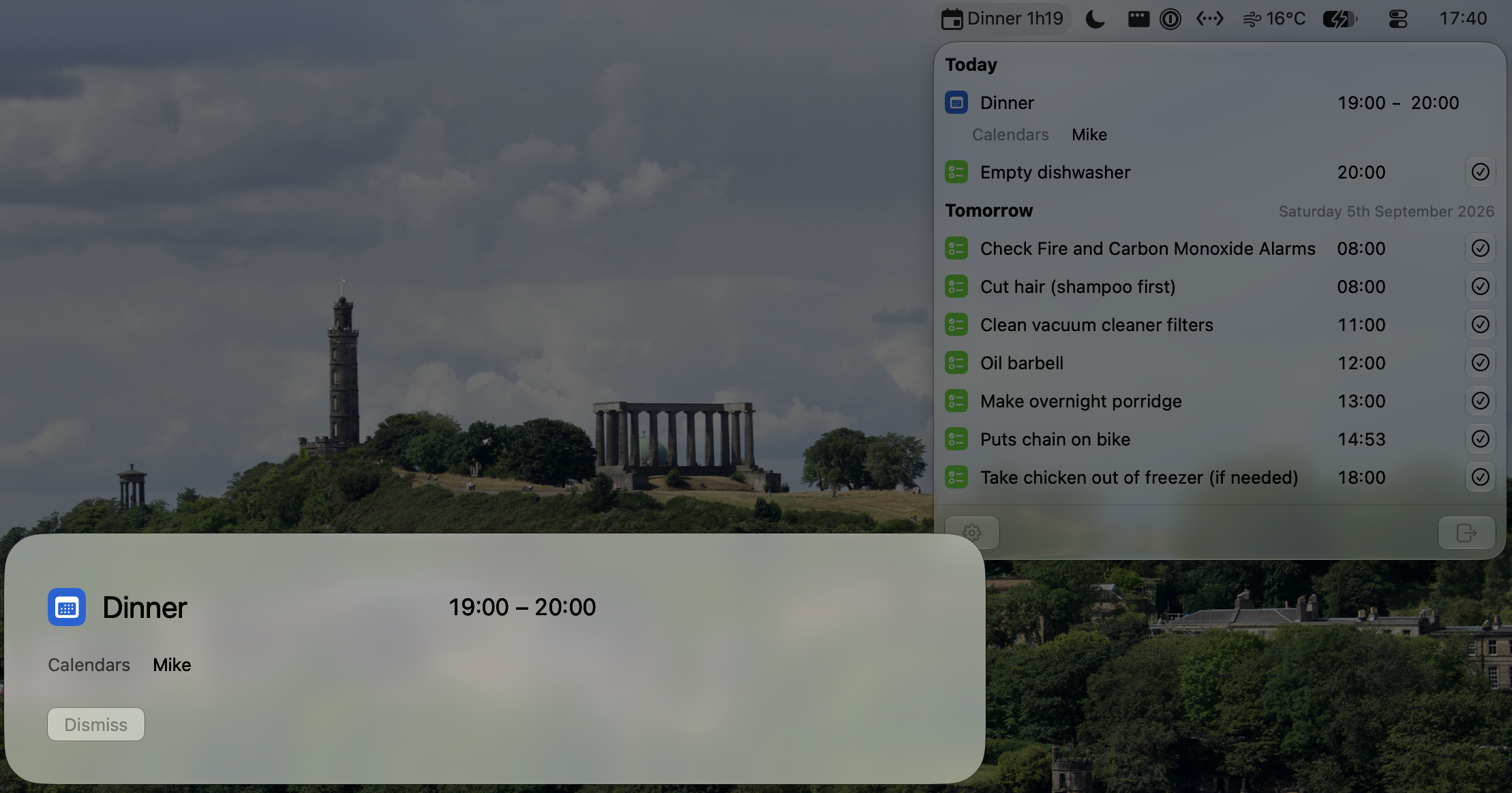
A small menu bar agenda
Your next event or reminder and a countdown. Click for today and tomorrow, with the details tucked away until you need them.
Interrupt procrastination
An accepted event or due reminder takes over every display, including full-screen apps. It interrupts what you're doing so you can stop putting it off.
Act from the reminder
Join Zoom, Teams or Meet calls from the alert, or press Return to join a call or complete a reminder. Dismiss the alert or snooze a reminder if you need more time.
Native macOS integration
Uses your existing calendars.
MinMaxCal uses the calendars and reminder lists you already have in macOS. Choose which ones to show, with duplicate meetings combined and overdue reminders kept visible until completed. Your Mac’s accounts handle syncing, so there’s no extra account to create.
Optionally mirror events between calendars, keeping the details or showing only Busy or Travel. Preview the changes before switching mirroring on; the original events stay unchanged.
brew install --cask minmaxcalAllow Calendar access when you open the app. Reminders are optional. Setup guide
Or download for Mac